
Shift Passdowns for Plant Managers: Know What Happened Overnight Before the Morning Meeting
Plant managers: read every shift passdown before the morning meeting. See what happened overnight in each area, what's still open and who picked it up.
It's 7:40 AM. The production meeting starts at 8:00. In a lot of plants, the next twenty minutes go like this: a few texts from the night supervisor, a photo of the whiteboard, an email with "see below" and a quick lap of the floor to find out what nobody wrote down.
Now picture the other version. You open the shift passdown from each area, see what happened overnight, what's still open and who picked it up. When you walk the floor at 7:50, it's to look at things, not to collect status. And the 8:00 meeting is spent deciding, not rebuilding yesterday.
That second version doesn't take a new system or a new meeting. It takes a passdown (some plants call it a shift handover) that's written on the floor and that you can read from anywhere.
Why the passdown decides your first 15 minutes
The passdown between supervisors is the only thing that carries the plant from one shift to the next. As one IndustryWeek expert put it, "The shift hand-offs between the supervisor leaving and the supervisor just coming on is absolutely critical to maintain the alignment until the following morning when the process starts all over again." (IndustryWeek)
When that passdown is thin, the morning meeting has to fill the gap. Teeptrak, a vendor of production-monitoring software, describes it well: "The first half hour goes into rebuilding yesterday. The night shift describes a breakdown, the setter disputes the duration, someone looks for the log sheet…" (Teeptrak)
What a plant manager actually needs from the overnight passdown
You don't need every detail from every machine. Before the morning meeting, most plant managers want answers to three questions:
- What happened in each area overnight?
- What's still open?
- Did someone pick it up?
If the passdown answers those three, you walk into the meeting already knowing where to spend it.
Stop running the night shift by text
In a typical plant, the overnight news reaches the plant manager in pieces: a text, a group chat message, a photo of the whiteboard, or an email that only some people were copied on. Each piece made sense to the person who sent it at 3 AM.
The trouble is what that adds up to:
- You hear about problems second-hand, often after they've grown.
- The picture is scattered across phones, inboxes and a wall.
- There's nothing to look back on. When someone asks what happened last Tuesday, it's buried in a chat.
The supervisors are already writing this information down. It just doesn't land anywhere you can read it in one place.
How ShiftPanda puts the passdown where you can read it
ShiftPanda does one thing: shift passdowns. Your supervisors write them on the floor, and you read them from wherever you are.
- Written area by area, machine by machine. You set up your areas and machines once. Supervisors start a new passdown, review it and send it to the next shift.
- A quick look at every area. As an Admin, your home screen shows recent passdowns and a status for each area, such as "Not handed over yet" or "Issue reported".
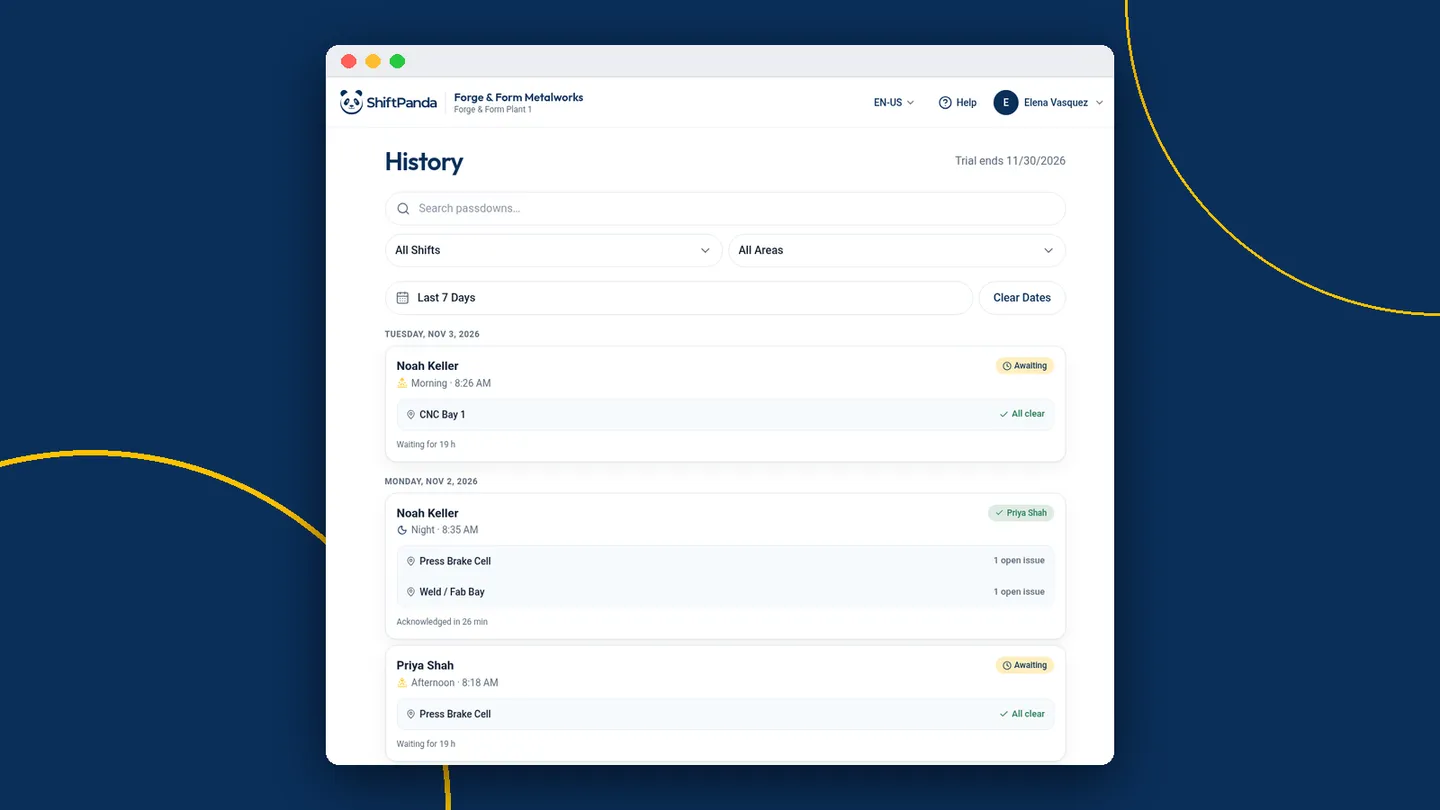
- Who picked it up. Every passdown shows who has read it and who acknowledged it, by name, so "I never got that" has an answer.
- Open issues in one list. Supervisors can log an issue during the shift against an area and machine, and it goes on the Open Issues list and carries over onto the next passdown, instead of living in someone's head.
- Last week is still there. Search History by shift, area and date to find past passdowns, one card per area.
- Nothing to install. It runs in the browser on a phone or tablet. Lose Wi-Fi mid-passdown and what you've typed is still there when you're back.
ShiftPanda doesn't replace your MES or your maintenance system. It holds what those systems usually don't: what the outgoing supervisor saw, what's still open and what the next crew needs to know.
Make the floor walk about seeing, not status
When status is already written down, your walk can do its real job. The Lean Enterprise Institute warns against leaders who "take a 'tour' rather than a true gemba walk." (Lean Enterprise Institute)
If you already know Press 4 was idle for part of the night and that someone acknowledged the passdown at the start of the shift, you can stop at Press 4 and ask a better question than "what happened?"
Turn the morning production meeting into decisions
Many plants run the morning as a chain of short meetings, with information "passed up and down the organization through a series of short meetings," in the words of the Lean Enterprise Institute. Each link in that chain is only as good as what came out of the night shift.
With the passdowns already read, the meeting can start at the open issues instead of at "so, what happened last night?" That's the difference between a 15-minute meeting and a 45-minute one.
Let your supervisors own the passdown, and you read it
The fastest way to kill a new tool is to mandate it from the office. Here's a calmer way to try it:
- Ask one or two supervisors to try it with their crew during the 30-day free trial.
- Let them set up their own areas and machines, since they know the floor better than anyone.
- Read the passdowns every morning for a couple of weeks, before the production meeting.
- Review History and Open Issues together at the end of the trial, and decide with your supervisors whether it's worth keeping.
And the usual objections:
- "It's another tool." It replaces the text, email or whiteboard note your supervisors already write, not your systems. There's nothing to install.
- "My supervisors won't use it." Then don't force it. Let the ones who are tired of decoding notes try it first, and let the results speak.
- "We already have an MES." Keep it. ShiftPanda sits alongside it and covers the part of the shift that lives in people's heads.
Be ready for the next shift tonight.
ShiftPanda turns the end of a shift into a two-minute handover your next crew actually reads.
30 days free · $9 per user per month after